Recently I learned that we can provide an autocomplete feature for <input> elements natively in the browser via the <datalist> tag.
I started playing around with it and made a reusable Glimmer component to search against any API with debouncing. If you're unfamiliar with debouncing, it is a technique where we only make the AJAX request once a user has stopped typing.
Try a demo of the autocomplete component in action.
The code for the demo can be found here: https://github.com/iamdtang/autocomplete-input.
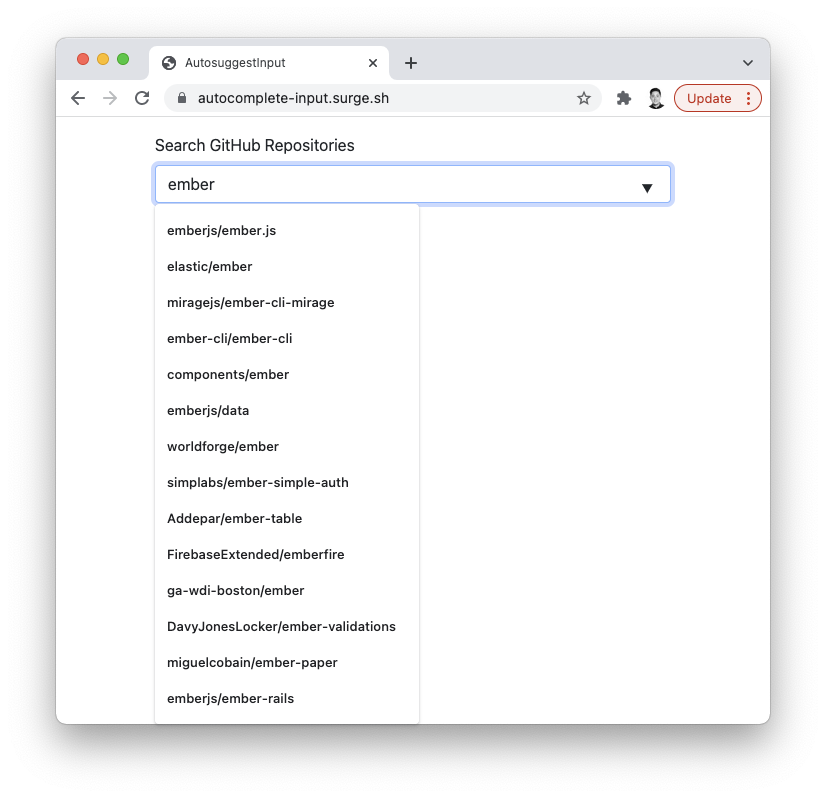
How to Use the AutocompleteInput Component
Now I'll describe how I implemented it. Let's start with the component invocation.
<label for="repo-search-input">
Search GitHub Repositories
</label>
<AutocompleteInput
id="repo-search-input"
placeholder="Example: ember"
@value=
@onInput=
@search=
@options=
/>The AutocompleteInput can nearly be a drop-in replacement for an <input> element with the addition of 4 arguments.
@valueis the value of the input that is bound to some tracked property@onInputis a function that updates the value passed into@value. We're following Data Down, Actions Up (DDAU) here.@optionsis an array of strings that is bound to some tracked property@searchis an asynchronous function that calls some API and updates the value passed into@options
Here is the backing class for the template above, which makes an AJAX request to the GitHub Repositories API.
import Controller from '@ember/controller';
import { tracked } from '@glimmer/tracking';
import { action } from '@ember/object';

export default class GithubRepoExampleController extends Controller {
  @tracked repos = [];

  @action
  async searchRepos(search) {
    const response = await fetch(
      `https://api.github.com/search/repositories?q=${search}`
    );

    const json = await response.json();

    this.repos = json.items.mapBy('full_name');
  }
}
The Implementation of the AutocompleteInput Component
Let's first look at the template.
<input
list=
value=
...attributes
onInput=
/>
<datalist id=>
<option value= />
</datalist>The value of the list attribute on the <input> needs to match the value of the id attribute on the <datalist>. This value is dynamically created using guidFor (see below) to ensure it is unique for every instance.
The onInput event is bound to this.onInputTask, which is an Ember Concurrency task with debouncing. This task will then call the @onInput argument. Because our component has an @onInput argument, we need to have ...attributes before onInput on the input. Otherwise, @onInput will take precedence and skip calling this.onInputTask.
Here is the backing class.
import Component from '@glimmer/component';
import { restartableTask, timeout } from 'ember-concurrency';
import { guidFor } from '@ember/object/internals';

export default class AutocompleteInputComponent extends Component {
  listId = guidFor(this);

  wasOptionSelected(value) {
    return this.args.options.includes(value);
  }

  @restartableTask
  *onInputTask(event) {
    const { value } = event.target;

    this.args.onInput(value);

    if (this.wasOptionSelected(value)) {
      return;
    }

    const debounce = 250;
    yield timeout(debounce);

    if (value) {
      this.args.search(value);
    }
  }
}
As mentioned above, I used Ember Concurrency, and specifically the restartableTask modifier on onInputTask to debounce the search as the user types into the input. The restartableTask modifier ensures that only one instance of a task is running by canceling any currently-running tasks and starting a new task instance immediately.
The onInputTask will then call the @search function (our async function that makes an AJAX request to the GitHub API) that we passed into the component with the user's search term.
A few other lines of code to point out:
if (this.wasOptionSelected(value)) {
  return;
}
The above lines are to ensure that when a user changes the input's value by selecting an option from the list of results, it doesn't trigger another AJAX request and open the menu of options again.
Conclusion
According to the Can I Use site, browser support for the <datalist> element is pretty good. Personally, I recommend using this over a custom solution if you need an autocomplete feature, as this is likely more accessible and way less complex.